1# plain.admin
  2
  3**Manage your app with a backend interface.**
  4
  5- [Overview](#overview)
  6- [Admin viewsets](#admin-viewsets)
  7    - [Model views](#model-views)
  8    - [Object views](#object-views)
  9    - [Navigation](#navigation)
 10- [Admin cards](#admin-cards)
 11    - [Basic cards](#basic-cards)
 12    - [Trend cards](#trend-cards)
 13    - [Table cards](#table-cards)
 14- [Admin forms](#admin-forms)
 15- [List presets](#list-presets)
 16- [Actions](#actions)
 17- [Toolbar](#toolbar)
 18- [Impersonate](#impersonate)
 19- [FAQs](#faqs)
 20- [Installation](#installation)
 21
 22## Overview
 23
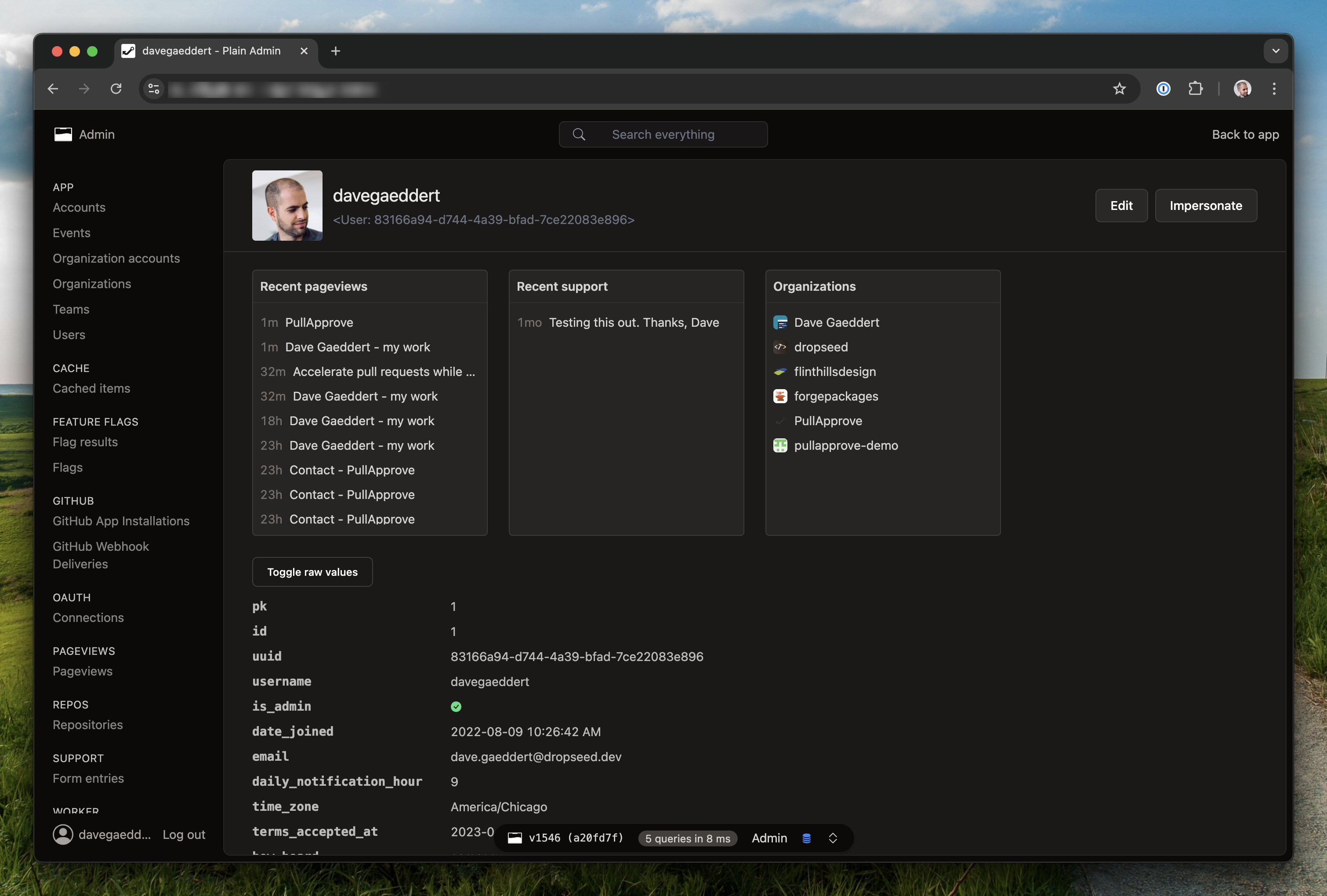
 24The Plain Admin provides a combination of built-in views and the flexibility to create your own. You can use it to quickly get visibility into your app's data and to manage it.
 25
 26![Plain Admin user example](https://assets.plainframework.com/docs/plain-pageviews-user.png)
 27
 28The most common use of the admin is to manage your `plain.models`. To do this, create a [viewset](./views/viewsets.py#AdminViewset) with inner/nested views:
 29
 30```python
 31# app/users/admin.py
 32from plain.admin.views import (
 33    AdminModelDetailView,
 34    AdminModelListView,
 35    AdminModelUpdateView,
 36    AdminViewset,
 37    register_viewset,
 38)
 39from plain.models.forms import ModelForm
 40
 41from .models import User
 42
 43
 44class UserForm(ModelForm):
 45    class Meta:
 46        model = User
 47        fields = ["email"]
 48
 49
 50@register_viewset
 51class UserAdmin(AdminViewset):
 52    class ListView(AdminModelListView):
 53        model = User
 54        fields = [
 55            "id",
 56            "email",
 57            "created_at__date",
 58        ]
 59        queryset_order = ["-created_at"]
 60        search_fields = [
 61            "email",
 62        ]
 63
 64    class DetailView(AdminModelDetailView):
 65        model = User
 66
 67    class UpdateView(AdminModelUpdateView):
 68        template_name = "admin/users/user_form.html"
 69        model = User
 70        form_class = UserForm
 71```
 72
 73## Admin viewsets
 74
 75The [`AdminViewset`](./views/viewsets.py#AdminViewset) automatically recognizes inner views named `ListView`, `CreateView`, `DetailView`, `UpdateView`, and `DeleteView`. It interlinks these views automatically in the UI and sets up form success URLs. You can define additional views too, but you will need to implement a couple methods to hook them up.
 76
 77### Model views
 78
 79For working with database models, use the model-specific view classes. These handle common patterns like automatic URL paths, queryset ordering, and search.
 80
 81- [`AdminModelListView`](./views/models.py#AdminModelListView) - Lists model instances with pagination, search, and sorting
 82- [`AdminModelDetailView`](./views/models.py#AdminModelDetailView) - Shows a single model instance with all its fields
 83- [`AdminModelCreateView`](./views/models.py#AdminModelCreateView) - Creates new model instances using a form
 84- [`AdminModelUpdateView`](./views/models.py#AdminModelUpdateView) - Updates existing model instances
 85- [`AdminModelDeleteView`](./views/models.py#AdminModelDeleteView) - Deletes model instances with confirmation
 86
 87```python
 88@register_viewset
 89class ProductAdmin(AdminViewset):
 90    class ListView(AdminModelListView):
 91        model = Product
 92        fields = ["id", "name", "price", "created_at"]
 93        queryset_order = ["-created_at"]
 94        search_fields = ["name", "description"]
 95
 96    class DetailView(AdminModelDetailView):
 97        model = Product
 98        fields = ["id", "name", "description", "price", "created_at", "updated_at"]
 99
100    class CreateView(AdminModelCreateView):
101        model = Product
102        form_class = ProductForm
103
104    class UpdateView(AdminModelUpdateView):
105        model = Product
106        form_class = ProductForm
107
108    class DeleteView(AdminModelDeleteView):
109        model = Product
110```
111
112The `fields` attribute on list and detail views supports the `__` syntax for accessing related objects and calling methods. For example, `"created_at__date"` will call the `date()` method on the datetime field.
113
114### Object views
115
116For working with non-model data (API responses, files, etc.), use the base object views. These require you to implement `get_objects()` or `get_object()` methods.
117
118- [`AdminListView`](./views/objects.py#AdminListView) - Base list view for any iterable
119- [`AdminDetailView`](./views/objects.py#AdminDetailView) - Base detail view for any object
120- [`AdminCreateView`](./views/objects.py#AdminCreateView) - Base create view
121- [`AdminUpdateView`](./views/objects.py#AdminUpdateView) - Base update view
122- [`AdminDeleteView`](./views/objects.py#AdminDeleteView) - Base delete view
123
124```python
125from plain.admin.views import AdminListView, AdminViewset, register_viewset
126
127
128@register_viewset
129class ExternalAPIAdmin(AdminViewset):
130    class ListView(AdminListView):
131        title = "External Items"
132        nav_section = "Integrations"
133        path = "external-items/"
134        fields = ["id", "name", "status"]
135
136        def get_objects(self):
137            # Fetch from an external API, file, or any data source
138            return external_api.get_items()
139```
140
141### Navigation
142
143Views appear in the admin sidebar based on their `nav_section` and `nav_title` attributes. Set `nav_section` to group related views together.
144
145```python
146class ListView(AdminModelListView):
147    model = Order
148    nav_section = "Sales"  # Groups this view under "Sales" in the sidebar
149    nav_title = "Orders"   # Display name (defaults to model name)
150    nav_icon = "shopping-cart"  # Icon for the section
151```
152
153Setting `nav_section = None` hides a view from the navigation entirely.
154
155## Admin cards
156
157Cards display summary information on admin pages. You can add them to any view by setting the `cards` attribute.
158
159### Basic cards
160
161The base [`Card`](./cards/base.py#Card) class displays a simple card with a title, optional description, number, text, and link.
162
163```python
164from plain.admin.cards import Card
165from plain.admin.views import AdminView, register_view
166
167
168class UsersCard(Card):
169    title = "Total Users"
170    size = Card.Sizes.SMALL
171
172    def get_number(self):
173        from app.users.models import User
174        return User.query.count()
175
176    def get_link(self):
177        return "/admin/p/user/"
178
179
180@register_view
181class DashboardView(AdminView):
182    title = "Dashboard"
183    path = "dashboard/"
184    nav_section = ""
185    cards = [UsersCard]
186```
187
188Card sizes control how much horizontal space they occupy in a four-column grid:
189
190- `Card.Sizes.SMALL` - 1 column (default)
191- `Card.Sizes.MEDIUM` - 2 columns
192- `Card.Sizes.LARGE` - 3 columns
193- `Card.Sizes.FULL` - 4 columns (full width)
194
195### Trend cards
196
197The [`TrendCard`](./cards/charts.py#TrendCard) displays a bar chart showing data over time. It works with models that have a datetime field.
198
199```python
200from plain.admin.cards import TrendCard
201from plain.admin.dates import DatetimeRangeAliases
202
203
204class SignupsTrendCard(TrendCard):
205    title = "User Signups"
206    size = TrendCard.Sizes.MEDIUM
207    model = User
208    datetime_field = "created_at"
209    default_preset = DatetimeRangeAliases.SINCE_30_DAYS_AGO
210```
211
212Trend cards include built-in date range presets like "Today", "This Week", "Last 30 Days", etc. Users can switch between presets in the UI.
213
214For custom chart data, override the `get_trend_data()` method to return a dict mapping date strings to counts.
215
216### Table cards
217
218The [`TableCard`](./cards/tables.py#TableCard) displays tabular data with headers, rows, and optional footers.
219
220```python
221from plain.admin.cards import TableCard
222
223
224class RecentOrdersCard(TableCard):
225    title = "Recent Orders"
226    size = TableCard.Sizes.FULL  # Tables typically use full width
227
228    def get_headers(self):
229        return ["Order ID", "Customer", "Total", "Status"]
230
231    def get_rows(self):
232        orders = Order.query.order_by("-created_at")[:5]
233        return [
234            [order.id, order.customer.name, order.total, order.status]
235            for order in orders
236        ]
237```
238
239## Admin forms
240
241Admin forms work with standard [plain.forms](/plain/plain/forms/README.md). For model-based forms, use [`ModelForm`](/plain-models/plain/models/forms.py#ModelForm).
242
243```python
244from plain.models.forms import ModelForm
245from plain.admin.views import AdminModelUpdateView
246
247
248class UserForm(ModelForm):
249    class Meta:
250        model = User
251        fields = ["email", "first_name", "last_name", "is_active"]
252
253
254class UpdateView(AdminModelUpdateView):
255    model = User
256    form_class = UserForm
257    template_name = "admin/users/user_form.html"  # Optional custom template
258```
259
260The form template should extend the admin base and use the form rendering helpers.
261
262```html
263{% extends "admin/base.html" %}
264
265{% block content %}
266<form method="post">
267    {{ csrf_input }}
268    {{ form.as_p }}
269    <button type="submit">Save</button>
270</form>
271{% endblock %}
272```
273
274## List presets
275
276On [`AdminListView`](./views/objects.py#AdminListView) and [`AdminModelListView`](./views/models.py#AdminModelListView), you can define different `presets` to build predefined views of your data. The preset choices will be shown in the UI, and you can use the current `self.preset` in your view logic.
277
278```python
279@register_viewset
280class UserAdmin(AdminViewset):
281    class ListView(AdminModelListView):
282        model = User
283        fields = [
284            "id",
285            "email",
286            "created_at__date",
287        ]
288        presets = ["Active users", "Inactive users"]
289
290        def get_objects(self):
291            objects = super().get_objects()
292
293            if self.preset == "Active users":
294                objects = objects.filter(is_active=True)
295            elif self.preset == "Inactive users":
296                objects = objects.filter(is_active=False)
297
298            return objects
299```
300
301## Actions
302
303List views support bulk actions on selected items. Define actions as a list of action names, then implement `perform_action()` to handle them.
304
305```python
306class ListView(AdminModelListView):
307    model = User
308    fields = ["id", "email", "is_active"]
309    actions = ["Activate", "Deactivate", "Delete selected"]
310
311    def perform_action(self, action, target_ids):
312        users = User.query.filter(id__in=target_ids)
313
314        if action == "Activate":
315            users.update(is_active=True)
316        elif action == "Deactivate":
317            users.update(is_active=False)
318        elif action == "Delete selected":
319            users.delete()
320
321        # Return None to redirect back to the list, or return a Response
322        return None
323```
324
325The `target_ids` parameter contains the IDs of selected items. Users can select individual items or use "Select all" to target the entire filtered queryset.
326
327## Toolbar
328
329The admin includes a toolbar component that appears on your frontend when an admin user is logged in. This toolbar provides quick access to the admin and shows a link to edit the current object if one is detected.
330
331The toolbar is registered automatically when you include `plain.admin` in your installed packages. It uses [`plain.toolbar`](/plain-toolbar/plain/toolbar/README.md) to render on your pages.
332
333To enable the toolbar on your frontend, add the toolbar middleware and include the toolbar template tag in your base template:
334
335```python
336# app/settings.py
337MIDDLEWARE = [
338    # ...other middleware
339    "plain.toolbar.ToolbarMiddleware",
340]
341```
342
343```html
344<!-- In your base template -->
345{% load toolbar %}
346{% toolbar %}
347```
348
349When viewing a page that has an `object` in the template context, the toolbar will show a link to that object's admin detail page (if one exists).
350
351## Impersonate
352
353The impersonate feature lets admin users log in as another user to debug issues or provide support. This is useful for seeing exactly what a user sees without needing their credentials.
354
355To start impersonating, visit a user's detail page in the admin and click the "Impersonate" link. The admin toolbar will show who you're impersonating and provide a link to stop.
356
357By default, users with `is_admin=True` can impersonate other users. Admin users cannot be impersonated (for security). You can customize who can impersonate by defining `IMPERSONATE_ALLOWED` in your settings:
358
359```python
360# app/settings.py
361def IMPERSONATE_ALLOWED(user):
362    # Only superusers can impersonate
363    return user.is_superuser
364```
365
366The impersonate URLs are included automatically with the admin router. You can check if the current request is impersonated using [`get_request_impersonator`](./impersonate/requests.py#get_request_impersonator):
367
368```python
369from plain.admin.impersonate import get_request_impersonator
370
371def my_view(request):
372    impersonator = get_request_impersonator(request)
373    if impersonator:
374        # The request is being impersonated
375        # `impersonator` is the admin user doing the impersonating
376        # `request.user` is the user being impersonated
377        pass
378```
379
380## FAQs
381
382#### How do I customize the admin templates?
383
384Override any admin template by creating a file with the same path in your app's templates directory. For example, to customize the list view, create `app/templates/admin/list.html`.
385
386#### How do I add a standalone admin page without a viewset?
387
388Use `@register_view` instead of `@register_viewset`:
389
390```python
391from plain.admin.views import AdminView, register_view
392
393
394@register_view
395class ReportsView(AdminView):
396    title = "Reports"
397    path = "reports/"
398    nav_section = "Analytics"
399    template_name = "admin/reports.html"
400```
401
402#### How do I hide a view from the sidebar?
403
404Set `nav_section = None` on the view class. The view will still be accessible via its URL.
405
406#### How do I link to an object's admin page from my templates?
407
408Use the `get_model_detail_url` function:
409
410```python
411from plain.admin.views import get_model_detail_url
412
413url = get_model_detail_url(my_object)  # Returns None if no admin view exists
414```
415
416## Installation
417
418Install the `plain.admin` package from [PyPI](https://pypi.org/project/plain.admin/):
419
420```bash
421uv add plain.admin
422```
423
424The admin uses a combination of other Plain packages, most of which you will already have installed. Ultimately, your settings will look something like this:
425
426```python
427# app/settings.py
428INSTALLED_PACKAGES = [
429    "plain.models",
430    "plain.tailwind",
431    "plain.auth",
432    "plain.sessions",
433    "plain.htmx",
434    "plain.admin",
435    "plain.elements",
436    # other packages...
437]
438
439AUTH_USER_MODEL = "users.User"
440AUTH_LOGIN_URL = "login"
441
442MIDDLEWARE = [
443    "plain.sessions.middleware.SessionMiddleware",
444    "plain.auth.middleware.AuthMiddleware",
445    "plain.admin.AdminMiddleware",
446]
447```
448
449Your User model is expected to have an `is_admin` field (or attribute) for checking who has permission to access the admin.
450
451```python
452# app/users/models.py
453from plain import models
454
455
456@models.register_model
457class User(models.Model):
458    is_admin = models.BooleanField(default=False)
459    # other fields...
460```
461
462To make the admin accessible, add the [`AdminRouter`](./urls.py#AdminRouter) to your root URLs.
463
464```python
465# app/urls.py
466from plain.admin.urls import AdminRouter
467from plain.urls import Router, include, path
468
469from . import views
470
471
472class AppRouter(Router):
473    namespace = ""
474    urls = [
475        include("admin/", AdminRouter),
476        path("login/", views.LoginView, name="login"),
477        path("logout/", views.LogoutView, name="logout"),
478        # other urls...
479    ]
480```
481
482Create your first admin viewset for your User model:
483
484```python
485# app/users/admin.py
486from plain.admin.views import (
487    AdminModelDetailView,
488    AdminModelListView,
489    AdminViewset,
490    register_viewset,
491)
492
493from .models import User
494
495
496@register_viewset
497class UserAdmin(AdminViewset):
498    class ListView(AdminModelListView):
499        model = User
500        nav_section = "Users"
501        fields = ["id", "email", "is_admin", "created_at"]
502        search_fields = ["email"]
503
504    class DetailView(AdminModelDetailView):
505        model = User
506```
507
508Visit `/admin/` to see your admin interface.